 By nDir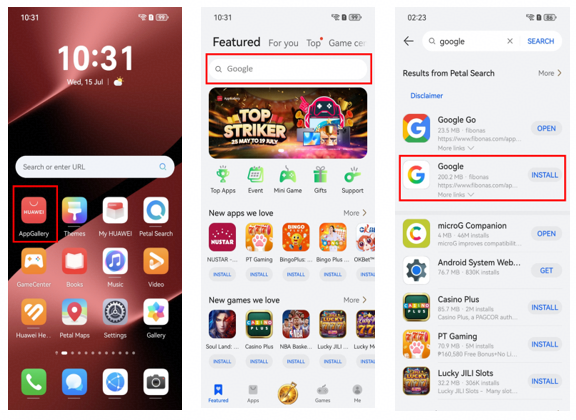
Setting up a Huawei phone abroad is usually less about finding one magic installer and more about getting the apps you actually use every day. Maps, email, banking, ride-hailing, messaging and work tools may all follow different installation routes, so the simplest approach is to set them up one by one and test them before you rely on the phone.
Start with the apps you need
Before installing anything, make a short list of the services you cannot do without. Search HUAWEI AppGallery first, since it is Huawei’s official app distribution platform. For apps that are not listed there, Petal Search may show a native app, a Quick App or a web version.
This is more useful than treating google installer for huawei as a single package that should solve every Google-related problem. Some services work well in a browser, while others need a native app or a different local alternative.
Use web versions when they are good enough
Gmail, Google Drive, YouTube, Maps and other services can often be opened from their official websites. A browser shortcut on the home screen is sometimes easier to maintain than an unofficial APK, especially if you mainly need email, documents or occasional map searches.
For banking, payments and government services, be more conservative. Use the provider’s official listing or website and avoid downloading a copy from a site you do not recognize.
Test the setup before travelling
Open each important app and check more than the login screen. Make sure notifications arrive, location works, files open and verification messages reach your SIM. If an app behaves strangely, try another network, check the phone’s date and time, update the app and restart the device before reinstalling it.
Huawei also provides Phone Clone for moving contacts, photos, calendar data and other basic information from an old phone. It can save time, but transferred apps should still be checked individually after the move.
Keep the phone easy to maintain
A good setup should still make sense a month later. Keep AppGallery, Petal Search and the phone software updated, remove duplicate app packages and remember where each important service came from.
The Huawei Community page linked through google installer for huawei is a useful starting point for Google setup and troubleshooting. The main idea is simple: use official Huawei tools first, use trusted web versions when practical, and avoid turning every missing app into a complicated installation project.