 By nDir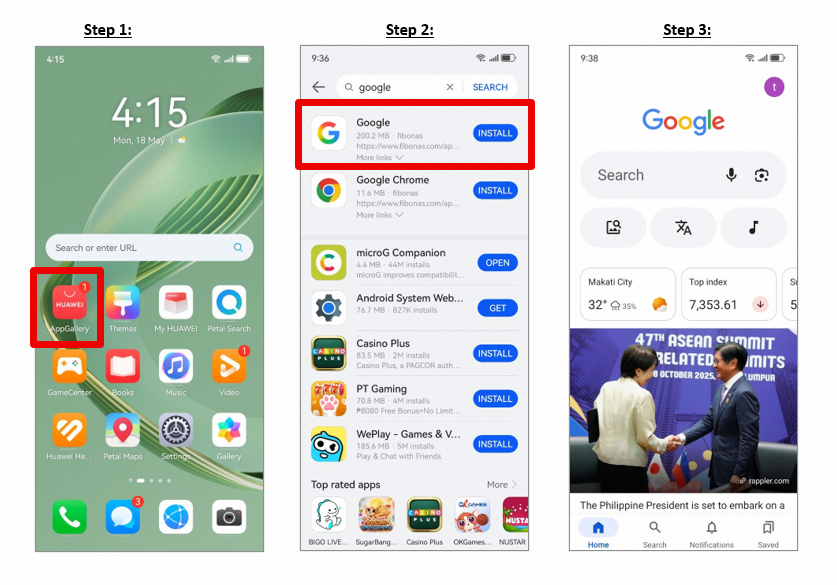
A new phone feels useful only when the apps you depend on are easy to reach. For Huawei users abroad, that may include Gmail, Maps, Drive, YouTube, local banking tools, transport apps, and work platforms. The safest approach is not to download a random installer package. Start with Huawei’s official app store, check what is available for your device, and use a compatible route only when an app requires Google services.
Start with HUAWEI AppGallery
Open HUAWEI AppGallery and search for the Google app you need. Some apps can be found directly, while others may be offered through a compatibility tool. Huawei’s community walkthrough for google installer for huawei describes searching AppGallery for GBox, installing it, and signing in before accessing supported Google apps.
AppGallery is Huawei’s official app distribution platform. Keep it and HMS Core updated before beginning. Availability can differ by country, phone model, and software version, so the result on one device may not be identical to another.
Understand What the Installer Does
The phrase Google installer for Huawei is often used as a general search term, but it does not refer to one universal official file that adds Google Mobile Services to every Huawei phone. In the community method, GBox provides a separate environment for supported apps. It should not be described as a permanent system-level installation of Google Play Services.
After signing in, install only the apps you actually need. Test account login, notifications, location, file uploads, and in-app payments. An app icon opening successfully does not guarantee that every feature will work on every device.
Use Web Apps and Local Alternatives
For services that do not work reliably, check the official web version. Gmail, Google Drive, Google Docs, and YouTube can be used in a browser for many everyday tasks. Add the page to the home screen if you want faster access.
Also check AppGallery for local alternatives. Overseas users may find that transport, food delivery, banking, and government services have native Huawei-compatible versions. For sensitive apps, use only the developer’s official listing or website.
Protect Your Account and Device
Sign in on a trusted network and review the permissions requested by each app. Avoid modified APK bundles, one-click GMS packages, and websites that ask you to disable security controls. These packages may be outdated, altered, or incompatible with your phone.
Use a unique Google password, enable account security checks, and keep recovery details current. If a compatibility tool is no longer needed, sign out before removing it.
Keep the Setup Maintainable
A practical order is simple: search AppGallery first, use the official web version when it is sufficient, and use a compatibility solution only for apps that genuinely need it. Update one source at a time and test important functions after every major phone update.
For the original Huawei Community steps, refer to the google installer for huawei guide. This approach gives overseas users access to familiar services without treating an unknown installer as a shortcut.